


tl;dr: a guide on what’s actually useful when adding a testing layer to your generated code.
You have an agentic coding workflow that makes sense. Your team is finally using the LLMs for much more than a smarter autocomplete. In fact, now you have background agents coding 24/7 for you. A few kick off automatically to update libraries, fix sentry errors, the simple stuff. As a result, your team is neither happy, nor feels more empowered. They are overwhelmed.
They are the silent victims of their own demise. They have carved out the fun parts of their job, the mindless things that they did when being ‘in-the-zone’ and given those to their AI bots. As payment, their job now resembles that of a poor man’s product manager or an extremely expensive manual QA. In turn, that means you are not seeing the ROI you expected. You are producing more LOCs, but you are releasing more brittle code, and your team spends countless hours mindlessly reviewing generated code, re-writing features, manually testing corner cases, and making sure UX keeps making sense after 10 different features were added and they didn’t even know about them. We were there not so long ago.
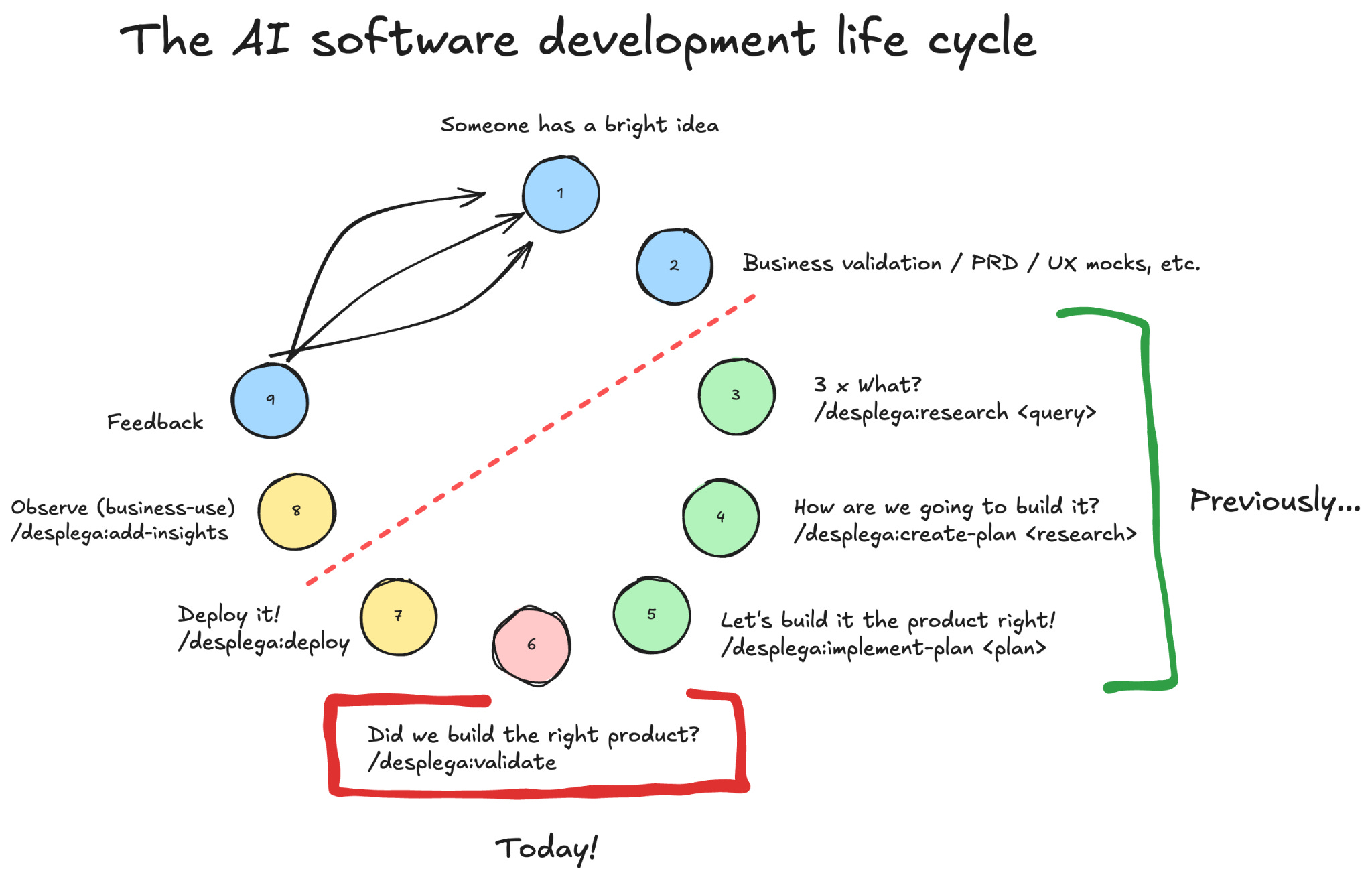
Yes! Our plans include verification steps, and we experimented with test driven plans (TDD skill), however what was key for us to crystallize the concept for us and our agents, so that we could target it explicitly. For that, we used Barry Boehm’s definitions:
Software Validation
The process of ensuring a software system meets the true needs and expectations of its users, famously summarized as
“Are we building the right product?”
Instead, Software Verification ensures the software conforms to its specified requirements and design, confirming that internal development stages align with the established requirements baseline. ie. “Are we building the product right?”.
As Engineers, traditionally we tend to overzealously focus on Software Verification, and disregard Software Validation as someone else’s task. Even when we add end-to-end tests we ask others to define such tests. In a world where coding, and software verification, become the norm for coding agents, actual software validation is a main engineering task.
Confusing Validation and Verification, and relinquishing the SWE responsibility in both leads to lower quality, and making it a less defensible product. This is your job.
Below, the 3 strategies we implemented to enhance our software validation & how they empower each other.
Note
This is our fourth installment in our agentic coding SDLC.
Previous related articles here: [0][1][2].
First: Remote browser sessions
Taras started his adventure in AI by contributing on browser-use. Early on, he had conversations with the team on their approach, using CDP, and he continues to monitor their progress. Since then, we also track alternatives like Chrome’s MCP, Open Operator, Skyvern, OpenAI Operator, Playwright MCP, etc. The list is so extensive that we have an internal benchmark on which one can perform different tasks faster and more accurately. However all of them have the same strength: they make things happen.
For us, that is no go. We don’t want a magic solution that generate scripts in python, access the DOM directly or intercept API requests to overcome system limitations. In fact, that would void all our efforts, and make it so that everything/anything works. What we need is something that would act as a human, but faster and more efficiently.
We developed our own browser operator focused on emulating human validation with that in mind. And qa-use browser cli became the tool that made it seamless to use.
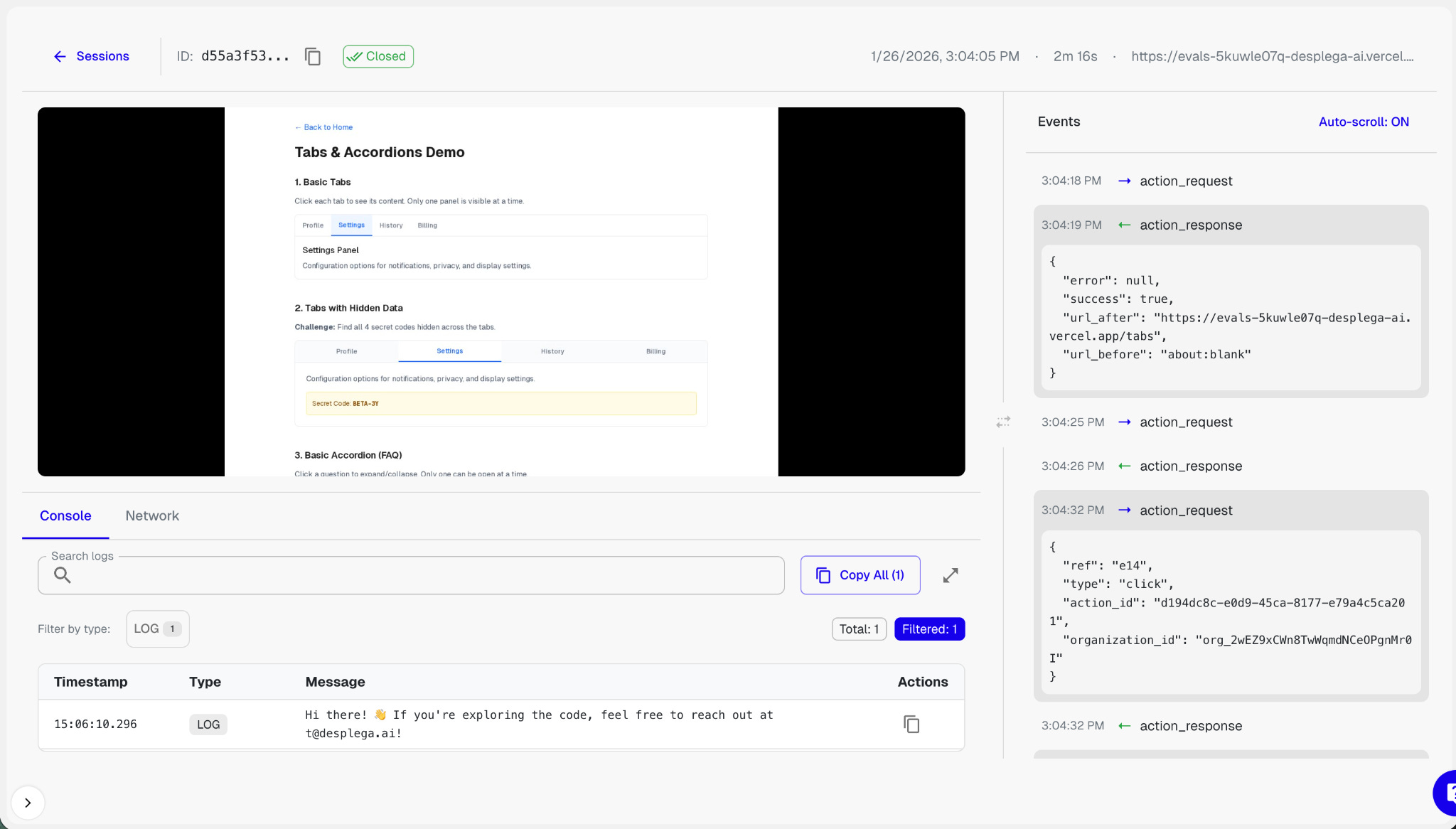
The key insights that make qa-use cli such a powerful tool are:
3 types of context: agent, users, business.
A research and plan before starting implementation are essential starting points, and every tool during the SDLC should have access to it. On top of that, for validation, we introduced two more concepts: Personas, and Business insights.Session Local Context
Instead of having a completely isolated system running in the cloud, or even in your local machine, qa-use leverages all the context and set up your coding agent has. This means onboarding to a task is immediate and transparent, most of the knowledge is already there.Personas
Prompts shared from product/ux that define user-types, you usually have one or two associated with each feature, and having them handy during these steps means that you can add some ‘color’ to your usability test.Business context
The key learning: don’t stress too much about it. In fact, sometimes it’s sufficiently clear if it’s defined in a CLAUDE.md file. We learned quite quickly that simply describing your business in the same way you’d do in a marketing leaflet will take you 80% there, together with the personas it would be good enough.
You need to run these remotely
What’s worse? Having to stop working while your laptop is “using your browser” or cloning the PR an agent sent you and running it locally to see the changes?
Obviously both are terrible, and neither scales with the amount of work your new agentic flows produce. The only way to achieve this kind of productivity is to have that team working with their own resources, and you be able to review from afar. Hence, running everything in the cloud, and then reviewing recording sessions at leisure seems best… and it is.
It really feels like you are working with a remote peer now.The silent killer: infra
This was the most tedious part, and the part that needs continuous time investment. The infrastructure required to run such browser sessions, keep recordings, manage logs, traces, storage, handle specific website controllers, etc. That’s a whole system that would become a real time sink as soon as your team starts producing at that extreme velocity. Eventually, you’ll need an expert team fully dedicated to this.
It’s extremely important to note that once you have this in place, you can actively see, and ask through comments in PRs, actions take place in your web/mobile/desktop app. It sounds wonderful, if it wasn’t because most features affect 10 services, 2 DBs, and need 4 different things to happen to trigger such flow…
Second: MCPs & CLIs
We were so proud, thus so wrong. We thought we had done it, and then we started implementing complex features in larger codebases. Guess what happened?
We found 2 categories of challenges that were making it so we would get in lengthy loops with our agents, Setup & Visibility. We defined Setup as either mocking 3rd parties, running specific routines, creating fake data, etc. Even though this deserves a whole article on its own, our major learning was to KISS and avoid investing countless hours on non business core activities. You can translate that into your agents, by giving them…
Visibility
This one was a key differential, and something that’s usually overlooked; we encouraged a deeper integration of our agents with our deployment and observability tools. In fact, we started implementing layers of tooling that before would have been deemed ‘unnecessary’ just to give that access.
What worked for us has been a mix of MCPs & cli-tools that give our agents full visibility into what is happening in their local/dev environment. A funny simple example was the bump in accuracy & reliability we saw when we started using pm2. Suddenly our agents had a much better understanding of what they could and couldn’t run, what was failing, the logs for all our services, and their state. A similar jump to that we saw when we started using Anthropic’s PostgreSQL MCP.
Another example of visibility that often gets overlooked, is how we allowed the use of APIs to retrieve and validate information. We want to stress that:
Majority of APIs are for our coding agents, in dev or production, so they get insights and act without the burden of UX.
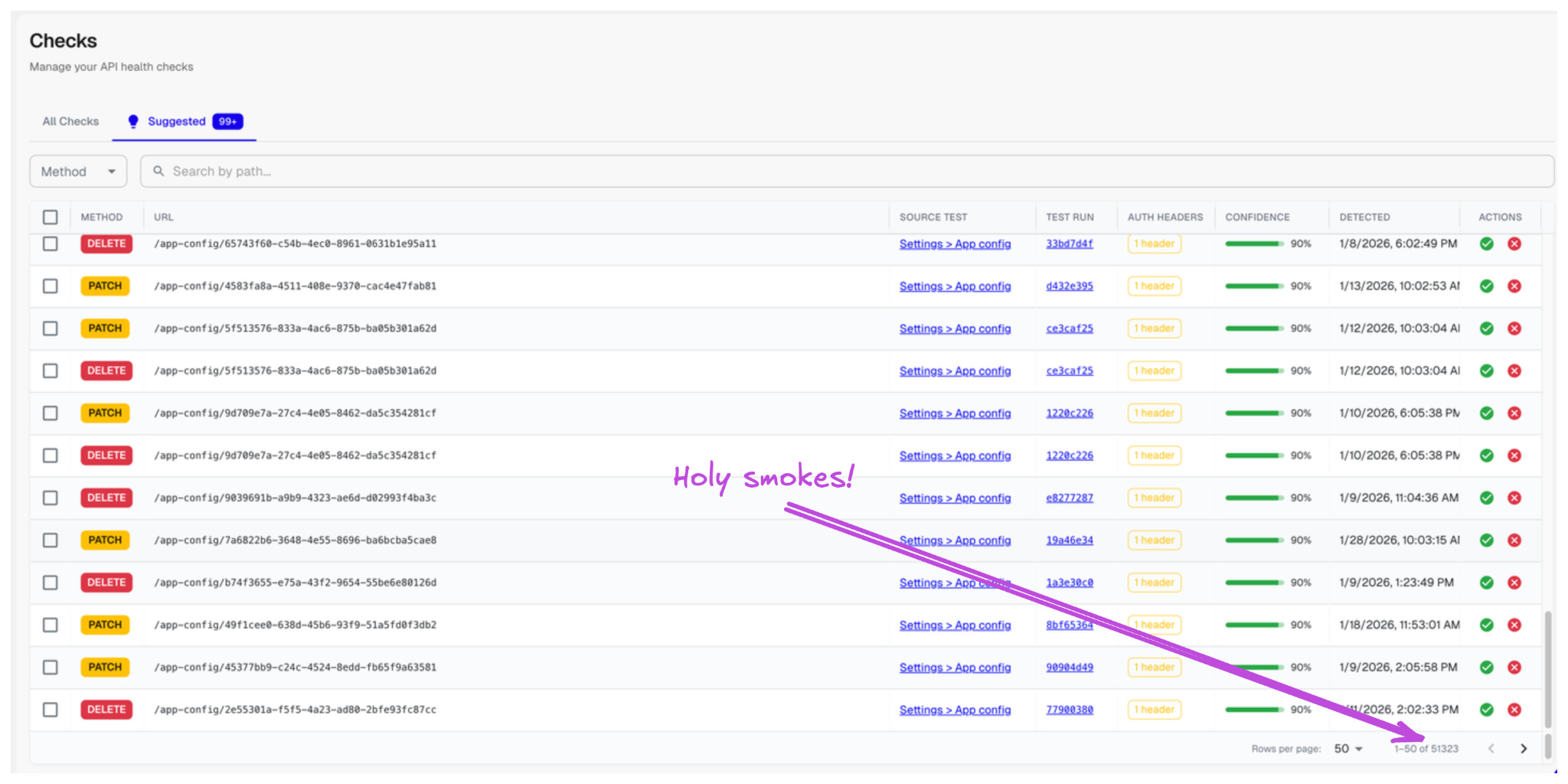
This is a another clear example of why you ought to think of your UX in terms of agents, not humans.
Third: A wrinkle in end-to-end tests.
Yes, you need end-to-end tests. Yes, a lot of them. Yes, you can convert your browser sessions into end-to-end tests. NO, I’M NOT GOING TO TALK ABOUT THAT.
I’m going to talk about the best unexpected use case for our testing cli.
If you are striving for an unearthly app, your end-to-end tests are not there to tell you that something is broken, they are there to tell you you’ve lowered the bar, ie. your app s*cks. That moves them from verification to validation, furthermore, that means your e2e tests are evaluating your app.
“to get a model to perform certain tasks, such as use a web browser, developers might go through an even more laborious process of creating many RL gyms (simulated environments) to let an algorithm repeatedly practice a narrow set of tasks.” - Andrew Ng
If you embrace this RL gym concept, instead of using your end-to-ends in isolation, you’ll start comparing results between builds to ensure the experience is improving, and you’ll use LLMs as a judge to verify such improvements. That’s our qa-use cli true power. You are now running continuously, creating new tests, and comparing between different builds.
This could be too abstract for many, so let’s go over an example we’ve been using for the past 3 months,
Speed run challenge
https://evals.desplega.ai/speedrun/challenge
An essential set of KPIs for everyone using a browser operator should include how efficient & effective the engine is at performing chained, complex, actions. Years ago, that would have meant having thousands of unit-, integration, and end-to-end tests. Nowadays you can flip the concept entirely, a single e2e test that can execute & compare multiple builds simultaneously with a single objective: complete the speed run as fast and seamlessly as possible.
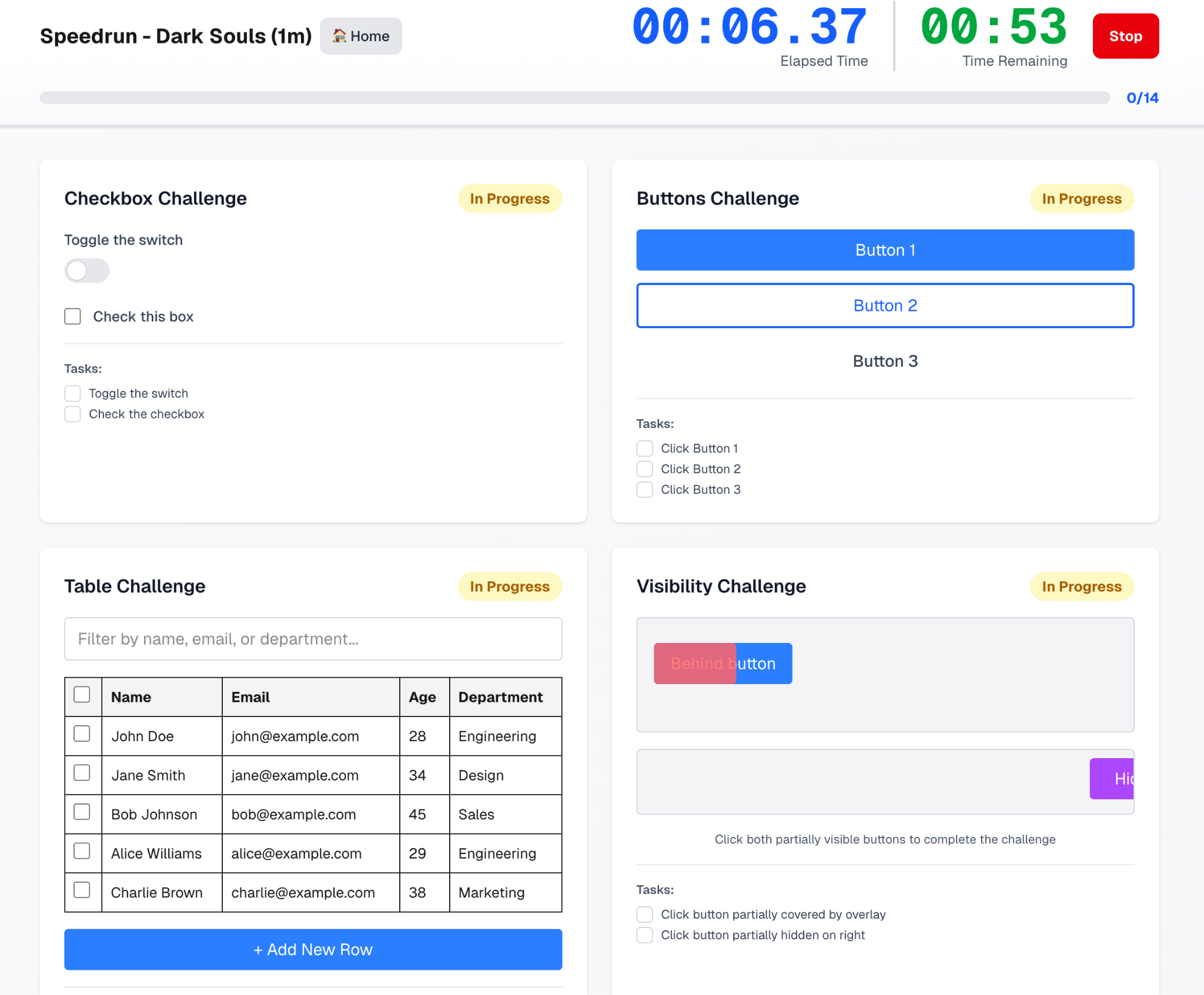
This is counter-intuitive, because you are still used to have a reasurred level of determinism in your code. The shift to see it at a high level, and think of it as benchmark comparison between releases may result foreign. However, this will actually give you a clear understanding of the progress, and your coding agents can self-correct accordingly. Remember, your team is magnitudes larger than before.
The-one-thing
Coding agents need much more clarity than a human. Even when you provide them with the right context & tooling, they will lack the “intuition”, and they overcompensate by being extremely confident. The same way that you wouldn’t trust a new joiner to deliver on a project autonomously without giving them clear objectives and incentives, you should provide your coding agents with clear, accurate, iterative objective functions.
This is the power of our Speed Run, an example on how to increase the autonomy and reliability of a coding agent. Defining those key evaluation mechanisms that would shape your unique Agentic SDLC will become your new tech leverage.
Keep it strong!
For the curious, here an example of our CLAUDE.md utilizes qa-use cli:
## E2E Manual Validation (qa-use)
NOTE: Always run from the git root! If you run from inside `be/` or `new-fe/`, the CLI may not find the right files.
Use `qa-use` CLI to manually verify features work end-to-end. Tests are in `qa-tests/`.
*Before testing:* Worker doesn’t hot reload - restart services first:
```bash
pm2 restart cope-worker cope-api
```
```bash
# Core workflow
qa-use browser create # Create browser session, DO NOT USE --tunnel as API runs in localhost
qa-use browser goto <url> # Navigate
qa-use browser snapshot # Get element refs (ALWAYS run before interacting)
qa-use browser click <ref> # Click by ref (e.g., e3)
qa-use browser click --text “X” # Click by text/description
qa-use browser fill <ref> “value” # Fill input
qa-use browser screenshot # Save screenshot.png
qa-use browser close # ALWAYS close when done
```
*Important:* Always run `qa-use browser close` when done - sessions consume resources.
*Existing tests:* See `qa-tests/` folder for available test definitions.
*Pattern for verifying new features:*
1. Create a session with the feature enabled
2. Use `qa-use browser snapshot